Native masonry layouts with CSS grid lanes
Native masonry layouts have been a long time coming to CSS and after years of debate over how they should work and fit into the language, we finally have display: grid-lanes.
If you want the full backstory on how we got here, Sunkanmi Fafowora has a great overview of the grid-lanes announcement over on CSS-Tricks. Here, I want to focus on the technical side of masonry, why it took so long to get right, and how display: grid-lanes works.
How we got here
Masonry has been a long-running CSS challenge. Back in 2017, Rachel Andrew opened a CSSWG issue about creating a native Pinterest-style layout. As Rachel noted back then, the closest native CSS got to this was multi-column layout (column-count), but that flows items top-to-bottom. Masonry needs to flow items across rows, tightly packing them into whatever column currently has the most available vertical space.
Pinterest’s masonry layout
That same year, Tab Atkins-Bittner shared a clever Grid hack to approximate the layout. It relied on knowing each item’s height in advance, making it less practical for dynamic content.
- Code language
- css
.hacky-masonry {
  display: grid;
  grid: auto-flow dense 1px / repeat(3, 1fr);
}

/* Manually set each item's row span */
.item {
  grid-row: span 50; /* Matches the item's 50px height */
}
As cool as this hack was, having to know the exact height of every item ahead of time wasn’t very practical, especially when you’re dealing with dynamic content, where heights can change. When I spoke with Tab Atkins-Bittner for my piece on the evolution of CSS Masonry, they put the broader challenge of designing CSS layouts this way:
“Flexbox was the first of the modern layout algorithms; we made a lot of mistakes and missteps while writing it, because we were trying to figure out how a modern layout model should work.”
That same process of figuring things out played a role in masonry’s development and until CSS had a better answer, many of us ended up reaching for David DeSandro’s legendary Masonry.js library instead.
But the challenge wasn’t just figuring out how to make masonry work in CSS. There was also the question of how it should fit into the language. Should it be part of Flexbox, an extension of Grid, or its own display value? For years, the CSS Working Group went back and forth without settling on a final syntax.
Mozilla first explored adding masonry to Grid, and WebKit later picked up that approach. It lets you keep display: grid and use a special value for the tracks to enable masonry.
- Code language
- css
.masonry {
  display: grid;
  grid-template-columns: repeat(auto-fill, minmax(14rem, 1fr));
  grid-template-rows: masonry;
}
This kept Grid’s familiar column definitions while letting the browser pack items vertically instead of aligning them into rows. You can read more about WebKit’s reasoning in Help us choose the final syntax for Masonry in CSS.
Google’s Chromium team had a different take. They argued that masonry’s layout algorithm was different enough from Grid to deserve its own layout mode, proposed as display: masonry .
- Code language
- css
.masonry {
  display: masonry;
  masonry-template-tracks: repeat(auto-fill, minmax(14rem, 1fr));
  gap: 1rem;
}
Their reasoning, along with an alternative syntax, is explained in An alternative proposal for CSS masonry.
The debate continued through several rounds of proposals, including WebKit’s broader item-flow idea for unifying aspects of Grid and Flexbox, but that approach was eventually dropped in favor of a simpler direction.
In January 2025, the CSS Working Group agreed to reuse CSS Grid’s track-definition and placement properties for masonry. By December 2025, the group had settled on a name for the new layout mode, grid-lanes. WebKit announced the direction in Introducing CSS Grid Lanes.

How grid lanes works
The nice thing about display: grid-lanes is that you don’t have to figure out where every item goes yourself. You define the tracks along one axis, just as you would with regular CSS Grid and the browser handles placement along the other.
For a typical masonry layout, that means defining your columns with grid-template-columns and letting the browser stack items into whichever lane makes the most sense.
You still get familiar Grid properties like grid-template-columns, repeat(), minmax(), gap, and explicit placement. Under the hood, though, Grid Lanes uses a different layout algorithm: it maintains tracks along the grid axis and packs items along the stacking axis. That makes it possible to build responsive masonry layouts without calculating item heights yourself.
A Basic Masonry Layout
- Code language
- css
.masonry {
  display: grid-lanes;
  grid-template-columns: repeat(auto-fill, minmax(14rem, 1fr));
  gap: 1rem;
}
This defines as many columns as fit, with each column at least 14rem wide. The browser handles the rest, placing items into lanes as it lays them out. Unlike regular Grid, items don’t need to share row heights, so each lane can grow independently.
Here’s how this layout would look:
A simple masonry layout example
The fill algorithm
Unlike regular CSS Grid, Grid Lanes doesn’t try to line everything up in rows. Instead, the browser keeps track of how much space each lane takes up and uses that to decide where the next item should go.
The process is pretty simple:
- Check how much each lane is filled.
- Place the next item in a suitable lane, usually the shortest one.
- Update that lane’s position and repeat.
For example, with three columns, the first three cards go into separate lanes. If column 2 is now the shortest, the next card goes there.
- Code language
- css
.masonry {
  display: grid-lanes;
  grid-template-columns: repeat(3, 1fr);
  gap: 1rem;
}
Controlling item placement
Most of the time, you’ll let the browser handle placement. But you can still use familiar Grid properties when you want more control. For example, grid-column: span 2 lets an item span two columns instead of occupying just one.
- Code language
- css
.featured-item {
  grid-column: span 2;
}
The browser actually places these explicitly positioned and spanning items first, before it runs the masonry algorithm for the rest of the auto-placed items. Spanning items affects how the remaining space is distributed, so placement can get more complicated than simply choosing the shortest lane, especially in larger layouts with lots of moving pieces.
Since items can appear in a different visual order from their source order, it’s also worth checking that the layout still makes sense when read from the HTML. This matters for accessibility, too, as screen readers generally follow the document order rather than the visual layout. We’ll cover this in more detail later.
A note on fit-tolerance
The Grid Lanes spec is still evolving, but its direction is becoming clearer. The CSS Working Group dropped the broader item-* proposal for unifying flow controls across layout modes and settled on display: grid-lanes for masonry. Another change is the rename of flow-tolerance to fit-tolerance, a property that helps control how the browser chooses between lanes of similar heights.
Say you have two lanes; one is 400px tall and the other is 398px. The second lane is technically shorter, but only by 2px. With a tolerance of 1em , the browser can treat both lanes as close enough in height and choose the lane that better preserves the source order, rather than always picking the shortest one. This can help prevent items from jumping ahead of earlier items just to fill tiny gaps.
Here’s how different values affect the layout:
- Code language
- css
.masonry {
  fit-tolerance: 0; /* favor the shortest lane */
}

.masonry {
  fit-tolerance: 1em; /* Treat lanes within 1em as close enough */
}

.masonry {
  fit-tolerance: infinite; /* Prioritize source order over compact packing */
}
A value of 0 favors tighter packing, while a larger tolerance gives the browser more flexibility to keep items closer to their source order. infinite prioritizes source order, even if that leaves more empty space in the layout. The default is normal, which resolves to 1em.
Switching directions
Masonry doesn’t have to flow vertically. With Grid Lanes, the tracks you define also determine the direction items are packed in. When you define grid-template-columns, items are packed vertically into columns. When you define grid-template-rows, items are packed horizontally into rows. The first is the familiar Pinterest-style layout, while the second creates a brick-like arrangement.
Check out this Waterfall and Brick demo, by ICS Creative, to switch between the two layouts and see the difference. Both use display: grid-lanes, just with different track definitions.
The WebKit team has also published the Field Guide to Grid Lanes. It includes an interactive playground, a reference for the different properties and values, and six demos covering layouts like photo galleries, recipe cards, timelines, and pinboards.
Subgrids in masonry layouts
One of the arguments for keeping masonry part of CSS Grid was that it would preserve features like subgrid.
If masonry had its own display: masonry layout mode, getting nested elements to align with their parent’s grid tracks could have required changes across multiple CSS specifications. Keeping masonry within the Grid model means subgrid can work alongside it.
Say you’re building a masonry layout of recipe cards, each with a title, an image, and a list of ingredients. subgrid lets the cards use their parent’s grid tracks rather than defining their own, making it easier to align their internal elements.
- Code language
- css
.masonry-container {
  display: grid-lanes;
  grid-template-columns: repeat(auto-fill, minmax(300px, 1fr));
}

.recipe-card {
  display: grid;
  /* The card's internal columns align with the parent masonry grid */
  grid-template-columns: subgrid;
}
Where we’re at today
Grid Lanes has come a long way from the early proposals and workarounds, but there’s still work to do. The specification is an Editor’s Draft, which means details can change as the CSS Working Group continues to refine the layout model.
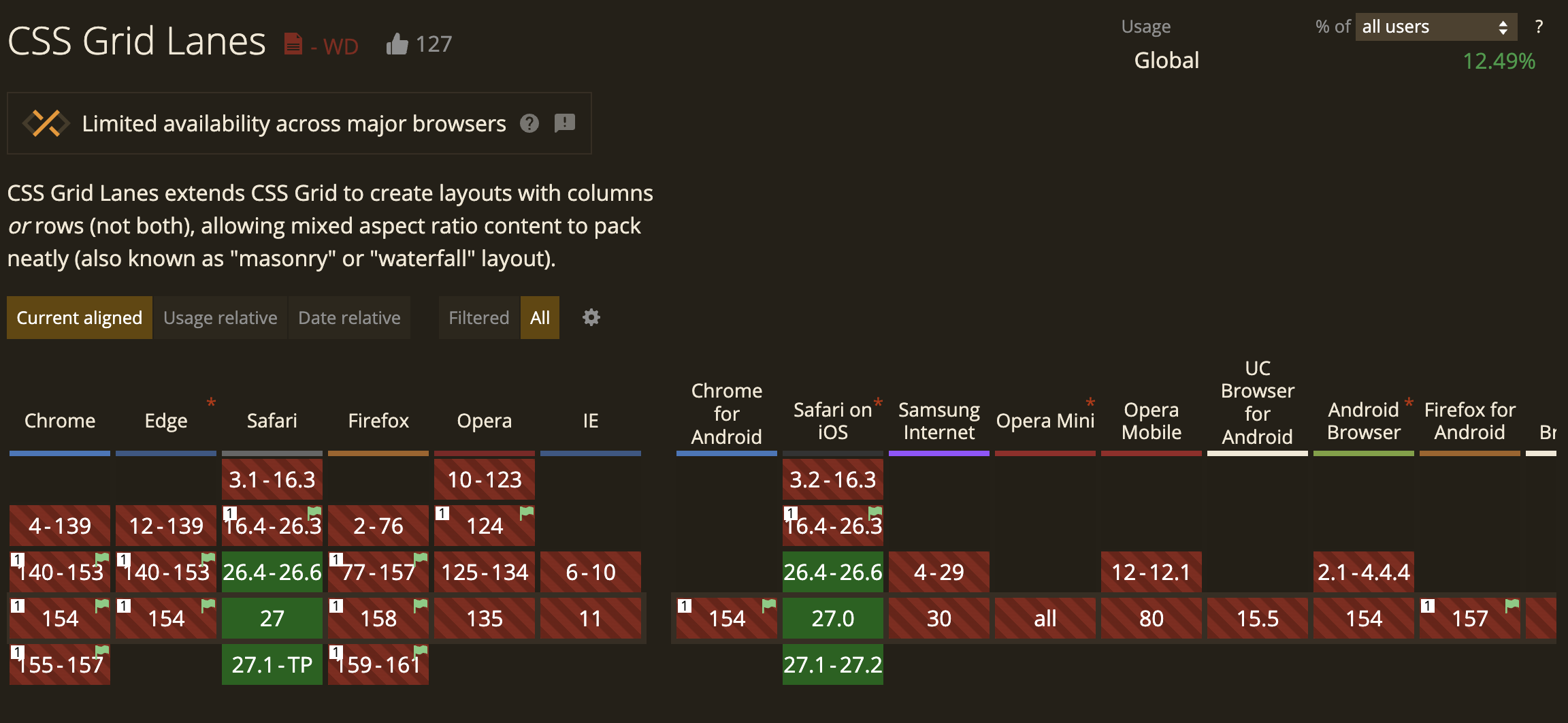
Browser support is another thing to keep an eye on. As of writing this article, Grid Lanes works in Safari 26.4 and later, but support in other browsers is still evolving. Check Can I Use for the latest updates, and consider using a simpler fallback for browsers that don’t support it.
Wrapping up
Grid Lanes has come a long way from the early proposals and workarounds. Here’s a quick recap of where things stand now:
- Masonry uses
display: grid-lanesas a separate layout mode. - Lanes are defined by
grid-template-columnsorgrid-template-rows. - Items are automatically placed into lanes based on available space.
fit-tolerancecontrols how much difference between lanes is treated as a tie.- The DOM source order stays intact, even when the visual order differs.
- Unsupported browsers can use a simpler fallback layout.
Enjoyed this article? You can support us by leaving a tip via Open Collective

Piccalilli exists to help you produce the best work of your career
Piccalilli exists to help you produce the best work of your career
Founded by Andy Bell in 2018, and now also produced by the wider team at Set.Studio, Piccalilli is an independent publisher providing high quality premium courses, articles and a newsletter.
